Batch starting 19 January 2026
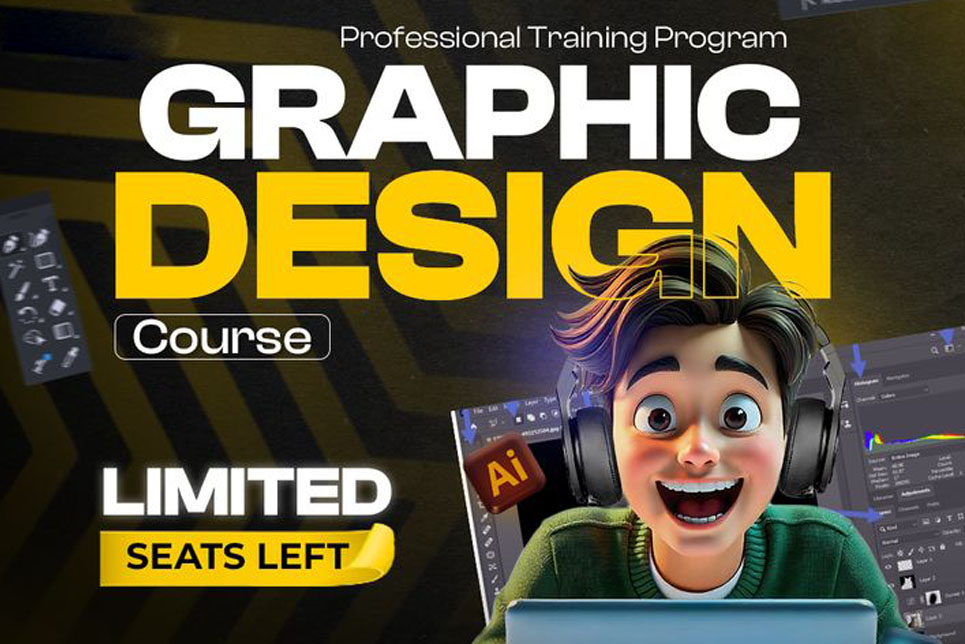
Complete Graphic Design Career Program
- Design More Than Visuals. Build a Career. Professional Graphic Design Training with Real Experience

Eligibility
- Students who have completed 10th or 12th and want to learn a creative skill.
- College students who want to build practical skills along with studies.
- Anyone who enjoys design, colors, creativity, or visual work.
- Aspiring graphic designers and branding enthusiasts.
- Freelancers and digital marketers who want to create their own designs.
- Beginners with no prior design experience are welcome.
- Anyone looking to start a creative career or side income.
Course Content
Graphic design plays a key role in today’s digital world, from branding and marketing to websites and social media. A strong visual identity through the right colors, typography, and design style helps brands connect with people and grow faster. Good design is no longer optional, it is a core skill in every digital initiative.
Our Graphic Design Training Program is created for individuals who want to learn design professionally and build real, usable skills. This course focuses on practical learning using Adobe Photoshop and Adobe Illustrator, helping students understand how design works in real projects, not just theory. From logo and brand design to social media creatives, posters, banners, and basic web UI, students learn everything needed to start a design career.
If you have a passion for creativity and want to turn your ideas into professional designs, this course is a strong step forward. Whether your goal is freelancing, working with agencies, or building your own brand, this training helps you develop confidence, skills, and a portfolio that speaks for itself.
What you will learn
Month 1: Design Basics + Adobe Illustrator (Foundation to Advanced)
Week 1: Design & Illustrator Basics
- Introduction to graphic design industry
- Raster vs Vector (Why Illustrator first)
- Color theory & typography basics
- Illustrator interface & workspace
- Artboards & document setup
- Shape tools & basic drawing
Week 2: Illustrator Core Tools
- Pen tool mastery
- Anchor points & path control
- Stroke, fill & gradients
- Pathfinder & shape builder
- Icon & symbol design
- Alignment & spacing
Week 3: Logo Design in Illustrator
- Logo design principles
- Types of logos (symbol, wordmark, combination)
- Grid-based logo design
- Negative space logos
- Color psychology for branding
- Logo export for print & digital
Week 4: Brand Identity & Print Design
- Brand color palette & typography
- Business card & stationery design
- Letterhead & brand assets
- Flyer, poster & banner design
- Print setup (CMYK, bleed, margins)
Month 2: Adobe Photoshop (Image, Creative & Marketing Design)
Week 5: Photoshop Basics
- Photoshop interface & tools
- Image resolution & canvas setup
- Layers, groups & smart objects
- Selection tools
- Crop, transform & adjustments
Week 6: Image Editing & Retouching
- Background removal (professional methods)
- Masking & clipping masks
- Color correction & enhancement
- Shadows, highlights & depth
- Product & portrait retouching
Week 7: Creative & Social Media Design
- Social media post & story design
- Poster & banner creatives
- Text effects & typography layouts
- Mockups & presentation designs
- Export for social media
Week 8: Advanced Photoshop
- Photo manipulation basics
- Ad creatives & thumbnails
- Brand-based design systems
- Real-world marketing creatives
- Client-style practice projects
Month 3: Real Projects, Portfolio & Career
Week 9: Branding Projects
- Complete logo design project
- Brand identity system
- Brand color & font usage
- Design consistency practice
Week 10: Marketing Design Projects
- Social media brand kit
- Poster & banner project
- Advertisement creatives
- Client brief understanding
Week 11: Portfolio Development
- Portfolio structure & layout
- Project presentation skills
- Design explanation & storytelling
- Portfolio refinement
Week 12: Career Guidance & Certification
- Freelancing basics
- Pricing & client communication
- How to get first clients
- Final assessment
- Certificate distribution
Why Choose This Course
- Industry-focused practical training
- Real projects, not theory
- Small batch, personal guidance
- Beginner-friendly teaching approach
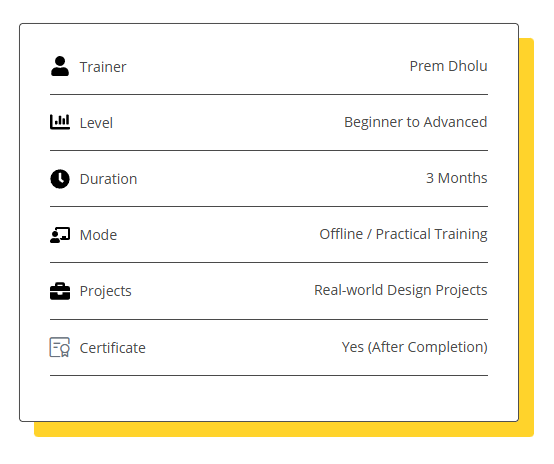
- Certificate after completion
What You Will Be Able to Do After This Course
- Design professional logos & brand identities
- Create social media posts & ad creatives
- Design posters, banners & marketing materials
- Build a strong design portfolio
- Start freelancing or apply for junior designer roles
Training Format
- Offline classroom training
- 2–4 hours daily (Mon–Fri)
- Small batch size
- Practice + assignments
- One-to-one doubt solving
Student Portfolio Preview
- 3–6 sample works (logo, poster, social media post)
- “Work created by students during training”
Who This Course Is For
- Students who want a creative career
- Beginners confused about design tools
- Freelancers who want professional skills
- Anyone who loves creativity and visuals
Tools You Will Learn
- Adobe Illustrator
- Adobe Photoshop
- Design assets & mockups
- Print & digital export workflow
Trainer / Academy Section
- Years of industry experience
- Real client project exposure
- Worked on branding & digital projects
- Mentorship-driven teaching
Career & Freelancing Support
- Portfolio guidance
- Freelancing basics
- Client handling tips
- Pricing & proposal basics
FAQs
1. Do I need any prior design knowledge to join this course?
No. This course is beginner friendly. We start from the basics and gradually move to advanced design concepts.
2. Who can join this graphic design course?
Students, beginners, freelancers, digital marketers, or anyone interested in creative work can join this course.
3. Which software will be taught in this training?
You will learn Adobe Illustrator and Adobe Photoshop from basics to advanced level.
4. Is this course practical or theory based?
This is a fully practical course. Students work on real design projects along with guided practice.
5. Will I be able to design logos and social media posts after this course?
Yes. By the end of the course, you will be confident in designing logos, brand identities, posters, banners, and social media creatives.
6. Will I get a certificate after completing the course?
Yes. A certificate is provided after successful completion of the training program.
7. Is this course suitable for freelancers or working professionals?
Yes. The course is suitable for freelancers and working professionals who want to upgrade or add design skills.
8. What kind of projects will I work on during the course?
You will work on logo design, brand identity, social media creatives, posters, banners, and real client-style projects.
9. Will this course help me get a job or start freelancing?
The course focuses on building strong skills and a professional portfolio, which helps in applying for jobs or starting freelancing.
10. Is this training online or offline?
This is an offline classroom training conducted at South Bopal, Ahmedabad.
11. What is the course duration and class timing?
The course duration is 3 months, with classes Monday to Friday, 2–4 hours daily.
12. Do I need my own laptop?
Yes. Having your own laptop is recommended for better practice and learning continuity.
13. Is graphic design a good career option?
Yes. Graphic design skills are in demand across branding, digital marketing, social media, and freelancing.
14. How can I enroll in the course?
You can enroll by calling or WhatsApp on +91 91069 97118 or by visiting the academy.
15. How can I pay the course fees?
The course fees can be paid through Cash, UPI, Cheque, or Card. All payment methods are 100% secure for your convenience and safety.
Admissions Open for January 2026 Batch
Limited seats available. Learn design the right way.

About Prem Dholu
Prem Dholu is a professional graphic designer and creative mentor with years of hands-on experience in branding, graphic design, and digital creatives. He has worked with businesses, startups, and personal brands, helping them build strong visual identities through practical and result-driven design.
With real industry exposure, Prem focuses on teaching design the way it is actually used in the market, not just theory. His training approach is simple, practical, and beginner friendly, making it easy for students to understand tools, design thinking, and professional workflows.
Through this training program, Prem aims to help students build confidence, strong design skills, and a portfolio that prepares them for freelancing, agency work, or a creative career.
premdholu.in→